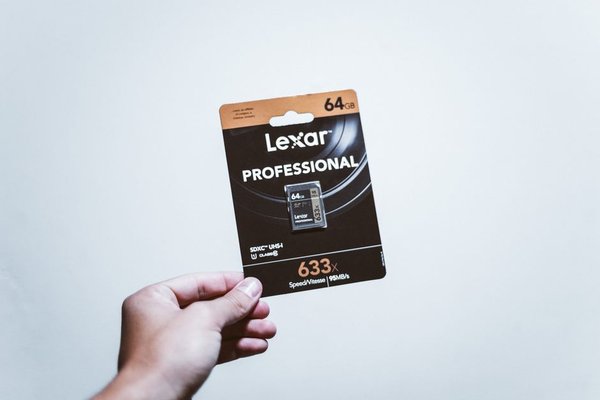
A card advertised at 200 MB/s can still struggle to record a camera’s highest-quality video. That is because the biggest number on an SD card package often describes peak reading, not the continuous writing required during filming. Camera memory card speed explained properly means separating three things: minimum sustained write speed, maximum transfer speed and the connection between the card and camera.
What V30, V60 and V90 actually guarantee
The SD Association’s Video Speed Class system identifies minimum sequential write performance under defined conditions. The number after the V is measured in megabytes per second, or MB/s. For recording, that minimum matters more than a brief burst of impressive speed.
V30 vs V60 vs V90
V30 denotes at least 30 MB/s sequential writing using the relevant speed-class method. V60 raises the minimum to 60 MB/s, while V90 sets it at 90 MB/s. These ratings do not say that a V90 card reads three times faster than V30, or that either card always operates at its minimum. Many cards exceed their ratings in suitable conditions.
Do not confuse the V rating with capacity: a 128 GB V30 card stores more material than a 64 GB V90 card, but the V90 carries a higher sustained-write classification. Choosing between them means balancing recording requirements with how much footage you expect to capture.
What do U1, U3 and Class 10 mean?
Older speed symbols still appear on packaging. U1 corresponds to a 10 MB/s minimum, U3 to 30 MB/s and C10 to 10 MB/s within their respective speed-class systems. U3 and V30 share a numerical minimum, but the standards use different access methods. If your camera explicitly specifies a Video Speed Class, follow that requirement rather than assuming every similarly numbered logo is interchangeable.
UHS-I vs UHS-II: speed of the interface
The UHS Roman numeral describes the bus connecting a card to its host, not its guaranteed sustained writing speed. UHS-I has a theoretical bus ceiling of 104 MB/s; UHS-II can reach 312 MB/s in half-duplex mode. These are interface limits, not promises of real camera or computer performance.
Full-size UHS-II cards typically have a second row of contacts. In a compatible UHS-I camera slot, they generally operate using the slower interface. A costly UHS-II card will not magically give that camera UHS-II transfer speeds.
The SD Association places V60 and V90 in UHS-II or faster interface families, while V30 is available on UHS-I. When comparing uhs i vs uhs ii, check the camera’s manual first. The interface supported by the camera can determine whether an expensive upgrade delivers any benefit.
Read speed is not SD card write speed
Read speed mainly affects retrieving existing files, including transfers to a computer. Write speed affects saving photos and recording video. Packaging that boasts “up to 200 MB/s” may refer to peak reading under ideal test conditions, so it cannot by itself establish recording suitability.
A card’s published maximum writing speed is useful, especially for clearing a camera’s photo buffer, but a maximum is not a sustained guarantee. For long video takes, prioritise your camera’s specified video speed class and tested compatibility. A fast compatible card reader matters too when downloading footage.
Choose by video bitrate, not resolution alone
Two cameras can both offer 4K video yet demand very different card speeds. Frame rate, codec, compression and bit depth affect the amount of data created each second. A compressed 4K recording may need less bandwidth than a high-bitrate Full HD mode.
Here is a practical calculation: a 200 megabits-per-second recording generates approximately 25 megabytes per second of video data, before overhead. You divide Mb/s by eight to get MB/s. A suitable V30 card may accommodate this, but you should still follow the camera maker’s required class and allow some headroom.
A 400 Mb/s recording instead produces about 50 MB/s of data. That exceeds the 30 MB/s minimum assured by V30, whereas V60 has a 60 MB/s classification. The video speed class is therefore a more meaningful starting point than simply asking whether your camera records 4K, 6K or 8K.
Some professional recording modes require CFexpress or another storage format rather than SD cards at all. Check the requirements for the exact codec and frame-rate combination you intend to use.
Why fast cards matter for burst photography
When you take a rapid series of RAW photographs, the camera initially stores images in an internal buffer. The SD card then receives that data. Faster real-world writing can help empty the buffer sooner, allowing another long burst. The card does not necessarily raise the camera’s maximum frames-per-second specification.
Imagine RAW images averaging 40 MB while the camera shoots ten per second. That creates roughly 400 MB of data per second during the burst, far beyond what a V90 rating alone guarantees. The buffer handles the surge; card performance affects recovery afterward. A guide to RAW vs JPEG file sizes can help explain why compressed files often allow longer bursts.
Wildlife and sports photographers should look for sustained-write tests conducted with their specific camera model. Two cards with the same V rating can have noticeably different buffer-clearing times.
How to buy and test the right card
Start with your camera manual, including the requirements for its highest-quality video mode. Confirm the supported SD interface, minimum speed class and capacity limits. Only then compare prices, storage size, sustained-write benchmarks and reputable sellers. Fake or poorly performing cards can create problems that no impressive printed rating will prevent.
Before important work, format a new card in your camera, record a long clip at the most demanding settings you use and shoot a sustained RAW burst. Play back the footage and check how quickly the buffer clears. Consider camera memory card capacity planning and safe photo backup workflows alongside speed; full or unprotected storage can ruin a shoot just as quickly.
Frequently asked questions
Is V30 enough for 4K video?
Often, particularly for compressed, moderate-bitrate 4K recording. But 4K does not have one fixed bitrate. Follow the card class required for your camera’s exact recording setting.
Will a UHS-II card work in a UHS-I camera?
Generally yes, if its capacity and card format are supported. However, it uses the camera’s UHS-I interface rather than reaching its full UHS-II potential.
Does V90 make photos sharper?
No. Card speed does not directly improve image quality. It can reduce buffer-clearing time and support more demanding recording modes.
Should I prioritise advertised read speed?
Prioritise sustained writing and camera compatibility for recording. Higher reading speeds become more useful when transferring large collections of files.
The right rating is the one your camera needs
V30, V60 and V90 indicate minimum sequential write classes; UHS-I and UHS-II describe the transfer interface. Neither answers every question by itself. Match the camera’s specifications, account for bitrate and bursts, and test your chosen card before relying on it. Paying more makes sense when the additional performance solves a real recording or workflow limitation.