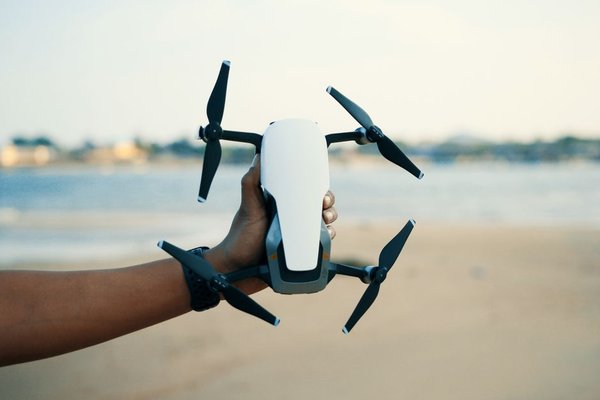
A camera drone is both a flying aircraft and a small imaging system. That combination makes shopping confusing: one model advertises 4K video, another highlights a larger sensor, and a third promises an impressive transmission distance. Those numbers describe different things. This beginner camera drone guide explains how the key parts work together, which specifications affect your footage, and where a modest first drone can make more sense than an expensive one.
Start With the Camera, Not the Headline Resolution
The most useful drone camera features are often hidden behind the megapixel count. A camera needs to gather enough light, expose it accurately, and keep its lens steady while the aircraft moves. High resolution cannot rescue poor exposure or shaky footage.
Sensor Size and Lens: What Changes the Image?
The image sensor converts incoming light into a digital picture. Among cameras with comparable sensor technology, a larger sensor generally has an advantage in dim conditions and can retain more detail in shadows. Marketing labels such as 1/1.3-inch are traditional sensor-format designations, not a literal measurement of the sensor’s width.
Megapixels describe the number of recorded picture elements, not overall image quality. More pixels can help with cropping a photograph, but lens quality, processing, noise reduction, and exposure remain important. Compare actual sample photographs, ideally taken in similar lighting, rather than deciding by megapixels alone.
Field of View and Exposure Controls
A wide-angle lens captures sweeping landscapes but makes distant subjects appear small. Some drones offer a second, longer-focal-length camera for tighter compositions. Check whether the drone allows manual shutter speed, ISO, exposure compensation, and RAW photographs if you want room to learn photographic techniques.
Why a Drone Gimbal Matters
A drone gimbal is a motorized mount that keeps the camera pointed steadily despite aircraft movement. A three-axis gimbal compensates for pitch, roll, and yaw; simpler designs may stabilize fewer axes or rely partly on electronic cropping.
This is especially visible during slow cinematic turns. Without effective stabilization, tiny corrections made by the aircraft become distracting tilts and shakes. Electronic image stabilization can help, but it may crop the view and cannot always match a well-tuned mechanical gimbal. Check whether the camera can tilt smoothly from the controller, not merely whether the product page says “stabilized.”
Drone Video Resolution Is Only One Recording Choice
For many first-time pilots, 4K recording offers useful cropping flexibility, while 1080p remains practical for simple social clips and smaller files. But drone video resolution is only part of the story. Frame rate affects how motion looks: 24 or 30 frames per second can suit ordinary footage, while 60 fps allows smoother playback or modest slow motion when edited appropriately.
Flight Time: Plan for the Return, Not the Maximum
A manufacturer’s advertised maximum flight time typically comes from controlled test conditions. Wind, repeated climbing, fast flying, low temperatures, battery age, and accessory weight can shorten a real flight. Treat the published number as a comparison point rather than guaranteed filming time.
For example, suppose a drone claims 30 minutes under ideal conditions. Do not schedule a 28-minute shoot over a distant location. Begin heading back with a generous battery reserve, and allow extra margin when flying against the wind. Spare batteries are useful, but learn safe landing habits before extending your sessions.
Transmission Range Is Not Permission to Fly Far Away
Transmission systems carry control signals and often a live camera preview. A longer rated range can suggest a more robust connection, but advertised distances usually assume favorable conditions. Buildings, trees, interference, terrain, and local transmission limits may reduce performance.
For beginners, prioritize a stable live view, clear signal warnings, and predictable control response. A specification claiming several kilometers does not mean you should fly that distance. Many jurisdictions require the pilot to keep the aircraft within visual line of sight. Check the rules of your aviation authority before launching.
Obstacle Sensing and Return-to-Home Are Safety Aids
Obstacle sensors may look forward, backward, downward, sideways, or in multiple directions depending on the drone. They can detect some hazards and support braking or avoidance, but thin wires, bare branches, glass, darkness, and certain surfaces remain difficult. Avoidance features may also be limited in particular flight modes.
Return-to-home is another helpful feature, often using satellite positioning to navigate toward a recorded home point. Before takeoff, confirm the home point, adequate positioning, and a suitable return altitude where the software permits adjustment. Neither automatic return nor obstacle sensing replaces watching the drone and checking the route yourself.
Storage, File Transfer, and Everyday Convenience
Many camera drones record to a microSD card, while some provide built-in storage as a backup or primary option. Check the manufacturer’s supported card types and minimum speed ratings, especially for high-bitrate video. Available gigabytes matter less if the card cannot sustain the recording speed.
A Simple First-Flight Camera Exercise
Choose a legal, open location away from people, roads, trees, and restricted airspace, with calm weather and plenty of daylight. After checking the aircraft, batteries, propellers, and home point, hover at a safe permitted height and try three short clips: a stationary view, a slow forward move, and a gentle sideways move. Keep the subject centered and avoid abrupt stick inputs.
Review the clips at home. Which movement looked smoothest? How did changing the angle alter your composition? Experimenting with familiar camera composition techniques is more useful than testing top speed.
What to Prioritize in a First Camera Drone
A sensible beginner camera drone has dependable stabilization, an understandable controller interface, reliable positioning, clear battery alerts, and accessible replacement parts. Check its packed weight and the requirements that apply where you fly; weight alone does not determine whether registration, pilot certification, or other obligations apply.
Frequently Asked Questions
Is 4K necessary for a beginner camera drone?
No. 1080p is enough for many casual videos, though 4K offers more detail and cropping room. Stable footage and good lighting usually make a bigger immediate difference.
Does a bigger sensor automatically mean better photos?
No. Sensor size can help in low light, but lens quality, exposure, processing, and shooting technique all influence the final image. Compare realistic sample images.
Can obstacle avoidance prevent every crash?
No. Sensors have blind spots and performance limits. Fly in clear space, maintain visual awareness, and never assume the drone can detect wires or small branches.
How much storage should I buy?
Start with a compatible card rated for your chosen recording mode, then estimate capacity from the drone’s actual bitrate and your expected shoot length. Frequent backups are more useful than endlessly accumulating footage on one card.
Conclusion
Choosing a first camera drone becomes easier when you consider the complete filming experience: sensor and lens, gimbal, recording quality, battery reserve, signal reliability, safety features, and storage. Learn what each specification changes in real footage, then choose a drone that leaves you enough attention to practice flying and composing a good shot.