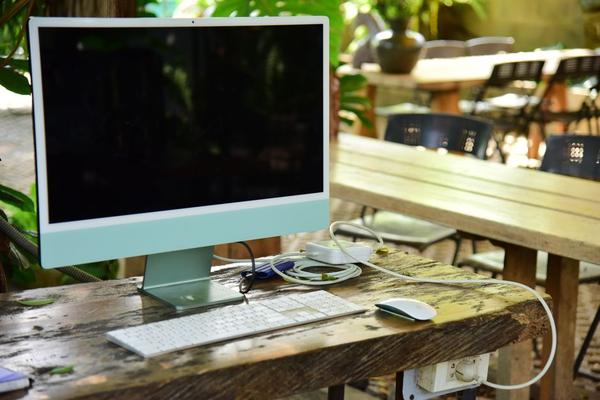
An all-in-one desktop makes the most sense when the desk itself is part of the buying decision. Instead of finding room for a tower, monitor, speakers, webcam and a bundle of cables, an AIO computer places the core hardware behind the display. That is especially attractive in a home office, family study area, reception desk or small-business workspace where simplicity matters more than future component upgrades.
The best all-in-one desktop computer in 2026 is not necessarily the fastest desktop available. A tower still wins if you want high-end graphics, easy repairs or major upgrades later. The strongest all-in-one choices focus on a different goal: giving you a capable computer, a good screen and a clean setup in one compact package.
Best all-in-one desktop computers to consider in 2026
Apple iMac 24-inch with M4: best overall for Mac users
Apple’s 24-inch iMac remains one of the clearest examples of what an all in one PC can do well. The M4 model combines a 24-inch 4.5K Retina display with Apple’s M4 chip, a 12MP Center Stage camera and a very slim enclosure. Current configurations start with 16GB of unified memory, while higher-spec versions offer more memory and storage for heavier workloads.
The iMac suits writers, designers, remote workers and families already using Apple devices. Its display is a major advantage because you are buying both a computer and a high-resolution screen. The downside is flexibility: memory and storage choices should be made carefully at purchase.
HP OmniStudio X: best large-screen Windows all-in-one
HP’s OmniStudio X line is a strong choice for buyers who want a larger Windows workspace without adding a separate monitor. The current range includes 27-inch and 31.5-inch models, with configurations built around Intel Core Ultra processors. Selected models also offer features aimed at hybrid work, including integrated cameras and adjustable stands.
A practical example is a home-based consultant who keeps a spreadsheet open beside a browser or video meeting. A 27-inch or larger screen makes that workflow more comfortable than a typical 23- or 24-inch AIO, while the integrated design keeps the desk far cleaner than a tower-and-monitor setup.
ASUS V600 AiO VM670: best for modern Windows features
The ASUS V600 AiO VM670 is one of the more forward-looking Windows options available in 2026. ASUS lists it with a 27-inch display, up to an AMD Ryzen AI 7 445 processor, Copilot+ PC support, up to 64GB of DDR5 memory and generous storage options.
Its appeal is balance. You get a large screen and a compact design, while the high memory ceiling makes it more suitable for demanding multitasking than many entry-level all-in-ones. It is a sensible fit for productivity, general creative work and shared household use, although exact configurations can vary by region.
Dell 24 All-in-One EC24250: best mainstream value
Dell’s 24 All-in-One EC24250 is a conventional, practical option. It uses a 23.8-inch Full HD display and comes in several processor, memory and storage combinations, including configurations with Intel Core processors, DDR5 memory and NVMe SSD storage. It is designed for everyday work and home use rather than demanding graphics tasks.
For email, web browsing, Microsoft 365, schoolwork, accounting software and video calls, this level of hardware is usually enough. The smaller footprint also makes it easy to place on a narrow desk or shared counter, making it a good space saving desktop for families and straightforward office workstations.
ASUS ExpertCenter P400 AiO: best for small business
The ASUS ExpertCenter P400 AiO is aimed more directly at business users. Current configurations offer up to a 24-inch Full HD anti-glare touchscreen, up to Intel Core i7 processing, up to 64GB of DDR5 memory and business-focused security features. An optional height-adjustable stand is useful where a workstation may be shared by different people.
For a clinic desk, retail counter or reception area, this can be a better fit than a consumer-focused machine. Business buyers should compare warranty coverage and support alongside raw specifications.
How to choose the right all-in-one PC
Start with screen size
Because the display is permanently tied to the computer, screen size deserves extra attention. Around 24 inches suits compact desks and general family use. A 27-inch screen gives more comfortable room for side-by-side apps, while 31.5-inch models can work well for people who keep several windows visible throughout the day.
Aim for at least 16GB of memory
For a new 2026 system, 16GB is a sensible starting point for most people. It gives modern browsers, video meetings and office software enough breathing room. Users editing large photos, running heavier creative tools or keeping many applications open should consider 32GB or more where available.
Choose SSD storage and check the ports
An SSD should be standard for a responsive modern desktop. A 512GB drive is comfortable for many households, while 1TB is safer for a large local photo, video or project library. Check USB-C, USB-A, Ethernet, headphone and display connections too. A beautifully minimal AIO can become less convenient if your accessories require several adapters.
Where all-in-one desktops compromise
The main advantage is less clutter. Built-in speakers, webcams and microphones reduce the number of separate devices you need. The trade-off is upgradeability: many AIO systems offer limited access to internal parts, and the screen cannot be replaced independently.
Serious gamers, 3D professionals and users who regularly upgrade graphics cards are usually better served by a tower. For general productivity, home use and small offices, however, a well-chosen AIO computer can provide enough performance while using far less desk space.
Natural internal-linking opportunities for this topic include desktop PC buying guide, home office computer setup and choosing a monitor for work.
Frequently asked questions
What is the best all-in-one desktop computer for most people?
For Mac users, the 24-inch M4 iMac is a particularly complete package because of its display, performance and integrated camera. Windows buyers should compare the HP OmniStudio X, ASUS V600 and Dell 24 All-in-One according to screen size, budget and workload.
Is an all-in-one computer better than a desktop tower?
It is better for space efficiency, simple setup and reduced cable clutter. A tower is better for upgrades, high-end graphics, repairability and users who want to replace their monitor independently.
How much RAM should an AIO computer have in 2026?
For general use, 16GB is a practical target for a new system. Heavier multitasking, creative work or longer ownership plans can justify 32GB or more where supported.
Can an all-in-one desktop handle gaming?
Casual and lighter games can run well on suitable models, but most all-in-ones are not designed as gaming desktops. If high frame rates, dedicated graphics or future GPU upgrades are priorities, a tower is usually the better investment.
A cleaner desk without giving up everyday performance
The best all-in-one desktops in 2026 succeed when they match the room as well as the workload. The iMac stands out for macOS users, HP’s OmniStudio X suits larger-screen productivity, ASUS covers modern home and business needs, and Dell handles straightforward everyday computing. Choose the screen size first, then confirm memory, storage, ports and support. Done well, an all-in-one is not a lesser desktop; it is a different kind of desktop built around convenience and space.